Guides

How to map mouse side buttons to any key (Windows 10 and 11)

Most mice have two side buttons that do nothing but back and forward in the browser. Putting them on an ability in a game, push-to-talk in Discord or next track takes seconds.

Symptoms

Why it happens

Windows gives the side buttons only “back” and “forward” and has no setting to change that. Changing them needs either the vendor's app or a program that catches the button and turns it into another key.

Free options

The fix with HEJİR

  1. Install and open HEJİR; a drawing of your mouse appears.
  2. Click the side button (Back or Forward) in the drawing.
  3. Choose “Keyboard key” and press the key you want (e.g. F, Ctrl+C). For media, choose “Media”.
  4. Done; it works at once, there is no save button.
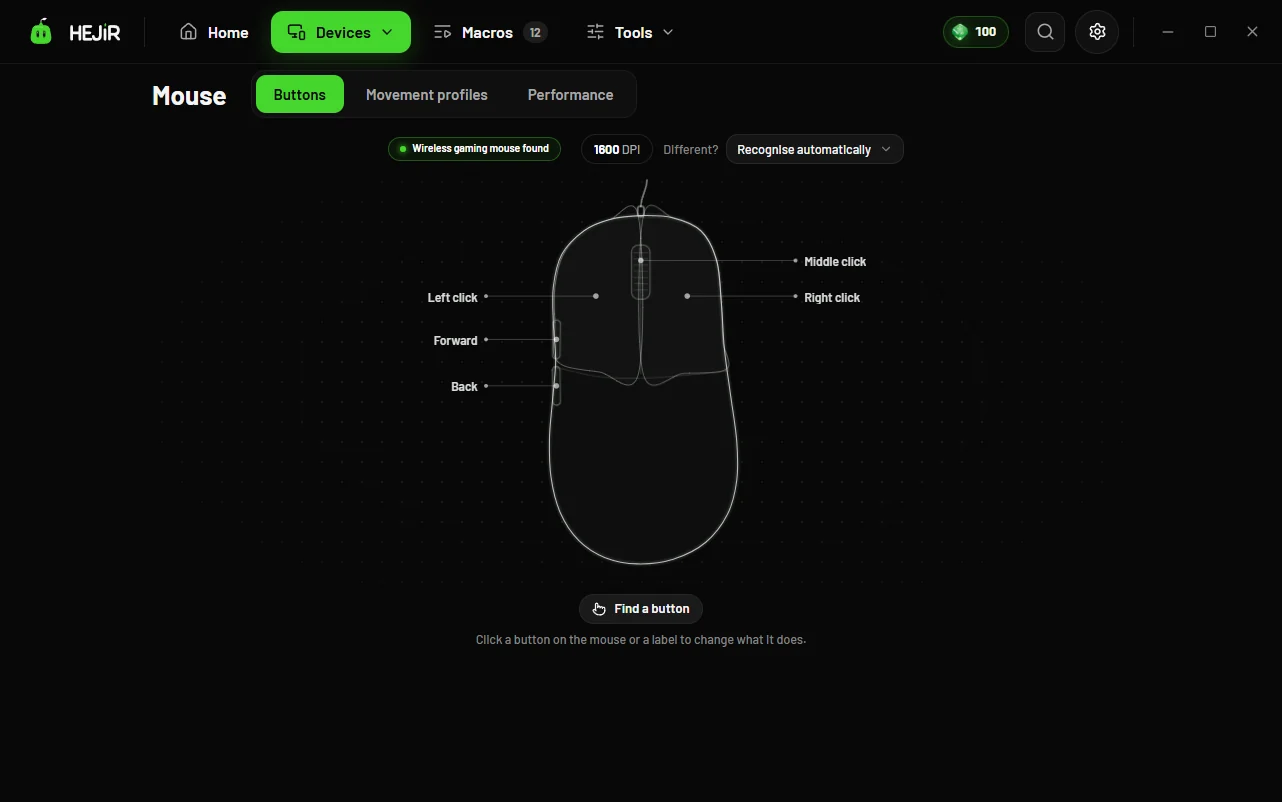
How to map mouse side buttons to any key (Windows 10 and 11)

HEJİR sees the side button before Windows does, stops its own job and sends the key you chose instead. On supported mice such as Logitech the mapping can also be written to the mouse's own memory, so it works even with HEJİR closed.

Try HEJİR freeFree; try Pro for 3 days, no card.

Good to know

FAQ

Does it work on a cheap no-name mouse?

Yes. Any mouse with side buttons works.

Is it cheating in games?

Turning one key into another is not cheating; use macros within each game's rules.

I want it different in one game only.

Per-game profiles are Pro: when the game starts, the mappings switch by themselves.

More guides

Mouse double clicking on a single click: why it happens and how to fix it without a new mouseHow to stop the Sticky Keys pop-up when you press Shift in gamesHow to add a sniper (DPI clutch) button to a cheap mouseMute your microphone with one key: in games, Discord and meetingsMake Caps Lock Esc on tap and Ctrl on hold (two jobs for one key)Microphone volume keeps changing by itself: why, and how to lock the levelMouse slips onto the second monitor in games: keep the cursor on the game's screenG HUB not working or not detecting your mouse: mouse settings without G HUBUse your VALORANT crosshair code in other games (PUBG, CS2, any game)How to turn off mouse acceleration (Enhance pointer precision) and other settings that hurt your aimFishing by sound in games: Minecraft, Stardew Valley, World of WarcraftNever miss the match-found sound: phone alerts for CS2, Dota 2, League of Legends, ValorantPUBG: pause your music automatically when a match starts, and get alerted when one is foundVALORANT: get alerted when a match is found and pause your music at agent selectRazer Synapse 4 not saving macros or not opening: button mapping and macros without SynapseAuto clicker keeps clicking after Alt+Tab: keep the clicks out of other windowsMacro keeps running after you release the key, or a key gets stuck: why and how to fix itDisable the Windows key while gaming: stop the Start menu kicking you outWireless mouse stuttering or lagging: the receiver, polling rate and free fixesLogitech G HUB alternative: a lighter mouse app that works with every brandX-Mouse Button Control alternative: a modern interface, macros and game toolsHow to make macros on a mouse without software (any brand)Remap keyboard keys on Windows 11: Caps Lock, the Windows key and shortcutsCrosshair overlay: put your own crosshair on screen in any gameRazer Synapse alternative: Razer mouse settings without SynapsePut Discord push-to-talk on a mouse side buttonHow to change mouse DPI (even on mice without software)A safe auto clicker: no malware, stops on Alt+Tab, on and off with one keyChange music without leaving the game: in-game hotkeys for Spotify and YouTubeDon't miss Discord messages and calls in game: a notice over the gameSudden loud sounds in games hurting your ears: turn explosions and flashbangs down automaticallyDiscord too quiet under the game: balance game and chat volume with one sliderShow your keypresses in OBS: a key overlay for streams and tutorialsShaky cursor or shaky hands: a stabilizer that smooths the mouse pointerChange songs on free Spotify without leaving the game: no Premium neededTurn Spotify down without turning the game down: Windows' volume mixer and one keyGame sound disappears while Spotify plays: Spotify's exclusive modeSee the name of the song playing while you game: a now-playing bar on screenKeyboard language keeps changing in games: turn off Alt+Shift, Ctrl+Shift and Windows+SpaceRedragon software not detecting your mouse or saying it's disconnected: what to doAttack Shark software missing or not working: an alternative for side buttons and macrosRemapping keys on a Royal Kludge (RK) keyboard: the easy way when you can't find the softwareRazer Synapse 4 not detecting your mouse, disconnecting or breaking macros: what to doGame doesn't recognize your mouse side buttons: making Mouse 4, Mouse 5 and extra buttons workBloody mouse macros without paying for Ultra Core 3/4: what's free, what isn't, and another wayGlorious CORE not detecting your mouse or not saving settings: what to doROCCAT is gone and Swarm won't work: side buttons and macros on your ROCCAT mouseCorsair iCUE not detecting your mouse or using too much CPU: what to doSteelSeries GG not detecting your mouse: what to doArmoury Crate not detecting your ROG mouse: what to doHyperX NGENUITY not detecting your mouse or keyboard: what to doCorsair iCUE alternative: a lighter app that brings your iCUE macros over in one clickSteelSeries GG alternative: buttons and macros without GG, your GG settings moved in with one clickLogi Options+ not detecting your mouse: what to do for MX Master and other Logitech miceLogi Options+ alternative: a light Windows app for your MX Master and other Logitech miceZowie mouse software doesn't exist: how to give a Zowie's side buttons new jobsOne mouse button, a different job in each app: app-specific buttons without Options+ or G HUBArmoury Crate alternative: a light app for your ROG mouseMicrosoft Mouse and Keyboard Center not detecting your mouse: what to do

HEJİR is coming soon

We'll email you on launch day; announcements come at most once a month.

We only use your address for HEJİR news; to leave, just write to us.